
Trying Vivaldi as My Other Browser

I use two to three browsers daily for different tasks. My default is the Zen Browser because as a former Arc user, Zen hits the sweet spot for features and usability.
However, I still need a secondary (and sometimes tertiary) browser for various workflows, which led me to give Vivaldi a proper try.
A Brief History of Vivaldi
Vivaldi was founded in December 2013 by Jon von Tetzchner and Tatsuki Tomita.
If that first name sounds familiar, it’s because von Tetzchner co-founded Opera Software and served as its CEO until 2010, which was 5 years before Opera was sold to the current owners, a Chinese-backed group of investors.
A number of former Opera employees joined von Tetzchner at Vivaldi Technologies to build what they had wanted to build all along, a feature full browser not controlled by outside investment.
The first technical preview launched in January 2015, with version 1.0 releasing in April 2016. Today, Vivaldi is an independent, employee-owned company headquartered in Oslo, Norway, serving approximately 3.8 million active users.
What I Like
The themes are genuinely great. I’m currently using one called “Pokemon Room,” but there’s a whole library of community-created themes to choose from. It’s a small thing, but having a browser that looks good makes the daily grind a little more pleasant.
You can disable features you won’t use. Vivaldi has a built-in mail client and calendar, but since I’m not switching away from my current setup, I appreciated being able to turn those off entirely rather than having them clutter the interface.
Solid defaults for power users. Tabs automatically hibernate to save RAM—something I’d normally have to install an extension for. Vertical tabs are easy to set up. Built-in setting sync works well, and they encrypt your settings locally so the data can’t be read on their end. I wish more companies did this.
Access to Chrome Features Without Chrome Vivaldi is Chromium-based, which means full Chrome Web Store extension support and the ability to install progressive web apps. If you’ve been wanting to ditch Chrome but still need that ecosystem compatibility, it is a solid pick. Also FWIW, I’m not subscribed to Perplexity or OpenAI so their Chromium forks do not interest me.
The Referral Link Situation
Here’s where things get a bit murky. Vivaldi is a free browser, and they need to make money somehow. The company sustains operations through revenue-sharing partnerships with search engines like DuckDuckGo and Ecosia, along with bookmark affiliates like Booking.com. Fair enough.
But there are a couple of things you should know if you install Vivaldi:
Delete the default bookmarks. The bookmarks that come pre-installed contain tracking referral links. After importing your own bookmarks, go through and remove all the ones Vivaldi added.
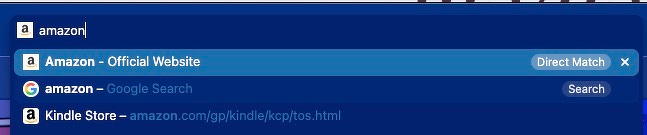
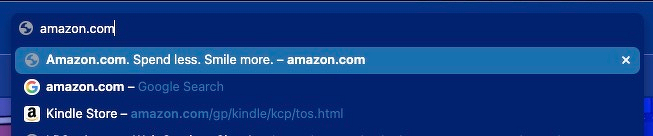
Disable Direct Match. This one took me a while to figure out. There’s a feature called “Direct Match” that hijacks your address bar and inserts referral links into your dropdown suggestions, prioritizing them over your actual history and bookmarks. It’s not a bookmark you can delete, it’s baked into the browser.
To disable it: Settings → Address Bar → Address Field Suggestions → uncheck “Direct Match”
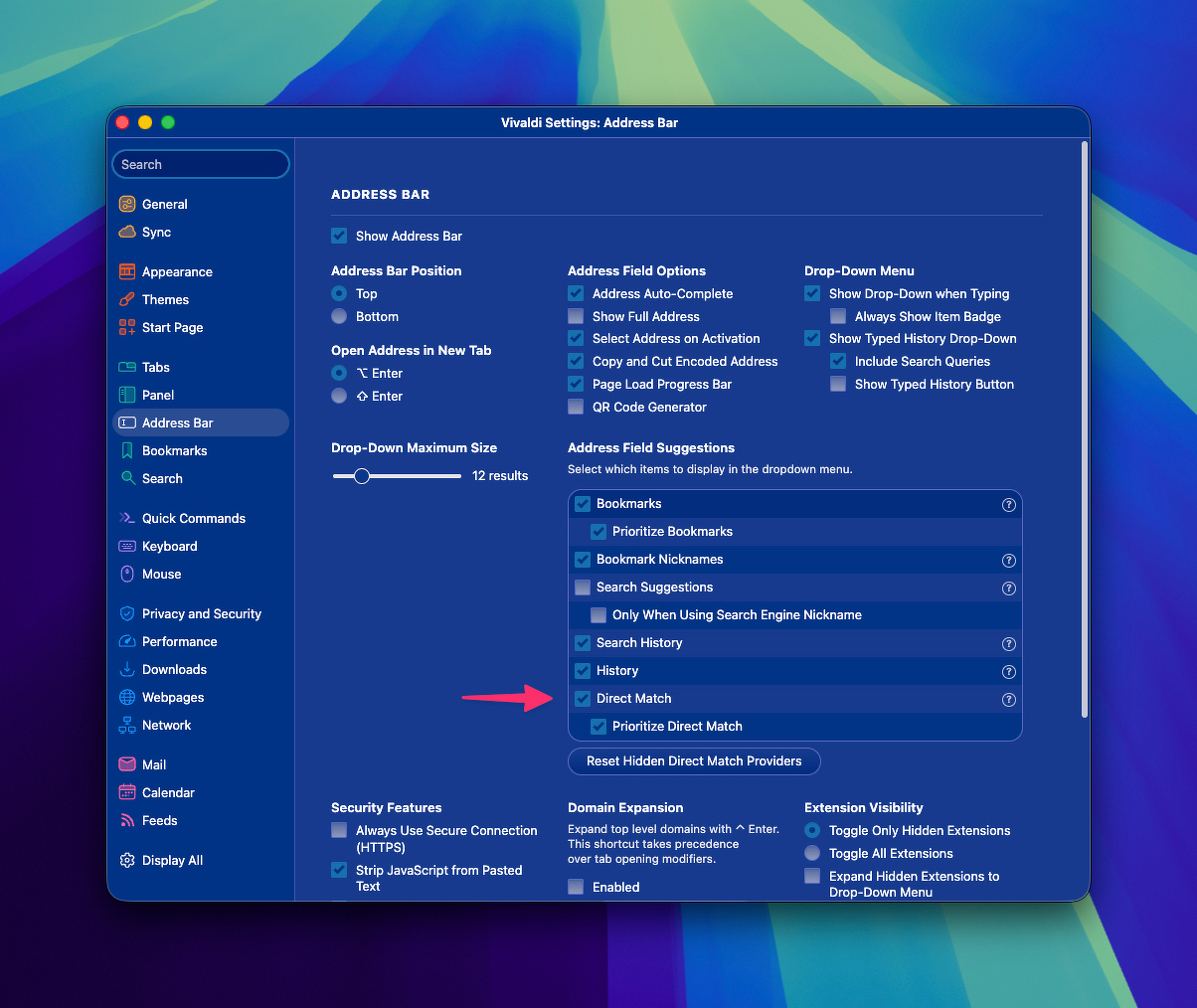
I’m sure most users haven’t done this because it’s not obvious what’s happening. I’d prefer if this were opt-in rather than something you have to hunt down and disable.
Before Disabling Direct Match
After Disabling Direct Match
Donate to support is how it should be
Vivaldi is a solid browser with genuine respect for customization and user control. The team’s Opera pedigree shows in the thoughtful features. You can donate directly to support their work, Vivaldi Donations.
The referral link integration feels a bit sneaky, even if I understand why it exists. If you’re aware of them and disable Direct Match upfront, Vivaldi makes for a capable browser (or secondary in my case).