
Online Tools
-
Trying Vivaldi as My Other Browser

I use two to three browsers daily for different tasks. My default is the Zen Browser because as a former Arc user, Zen hits the sweet spot for features and usability.
However, I still need a secondary (and sometimes tertiary) browser for various workflows, which led me to give Vivaldi a proper try.
A Brief History of Vivaldi
Vivaldi was founded in December 2013 by Jon von Tetzchner and Tatsuki Tomita.
If that first name sounds familiar, it’s because von Tetzchner co-founded Opera Software and served as its CEO until 2010, which was 5 years before Opera was sold to the current owners, a Chinese-backed group of investors.
A number of former Opera employees joined von Tetzchner at Vivaldi Technologies to build what they had wanted to build all along, a feature full browser not controlled by outside investment.
The first technical preview launched in January 2015, with version 1.0 releasing in April 2016. Today, Vivaldi is an independent, employee-owned company headquartered in Oslo, Norway, serving approximately 3.8 million active users.
What I Like
The themes are genuinely great. I’m currently using one called “Pokemon Room,” but there’s a whole library of community-created themes to choose from. It’s a small thing, but having a browser that looks good makes the daily grind a little more pleasant.
You can disable features you won’t use. Vivaldi has a built-in mail client and calendar, but since I’m not switching away from my current setup, I appreciated being able to turn those off entirely rather than having them clutter the interface.
Solid defaults for power users. Tabs automatically hibernate to save RAM—something I’d normally have to install an extension for. Vertical tabs are easy to set up. Built-in setting sync works well, and they encrypt your settings locally so the data can’t be read on their end. I wish more companies did this.
Access to Chrome Features Without Chrome Vivaldi is Chromium-based, which means full Chrome Web Store extension support and the ability to install progressive web apps. If you’ve been wanting to ditch Chrome but still need that ecosystem compatibility, it is a solid pick. Also FWIW, I’m not subscribed to Perplexity or OpenAI so their Chromium forks do not interest me.
The Referral Link Situation
Here’s where things get a bit murky. Vivaldi is a free browser, and they need to make money somehow. The company sustains operations through revenue-sharing partnerships with search engines like DuckDuckGo and Ecosia, along with bookmark affiliates like Booking.com. Fair enough.
But there are a couple of things you should know if you install Vivaldi:
Delete the default bookmarks. The bookmarks that come pre-installed contain tracking referral links. After importing your own bookmarks, go through and remove all the ones Vivaldi added.
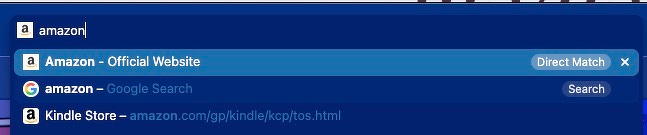
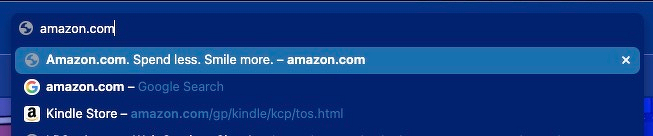
Disable Direct Match. This one took me a while to figure out. There’s a feature called “Direct Match” that hijacks your address bar and inserts referral links into your dropdown suggestions, prioritizing them over your actual history and bookmarks. It’s not a bookmark you can delete, it’s baked into the browser.
To disable it: Settings → Address Bar → Address Field Suggestions → uncheck “Direct Match”
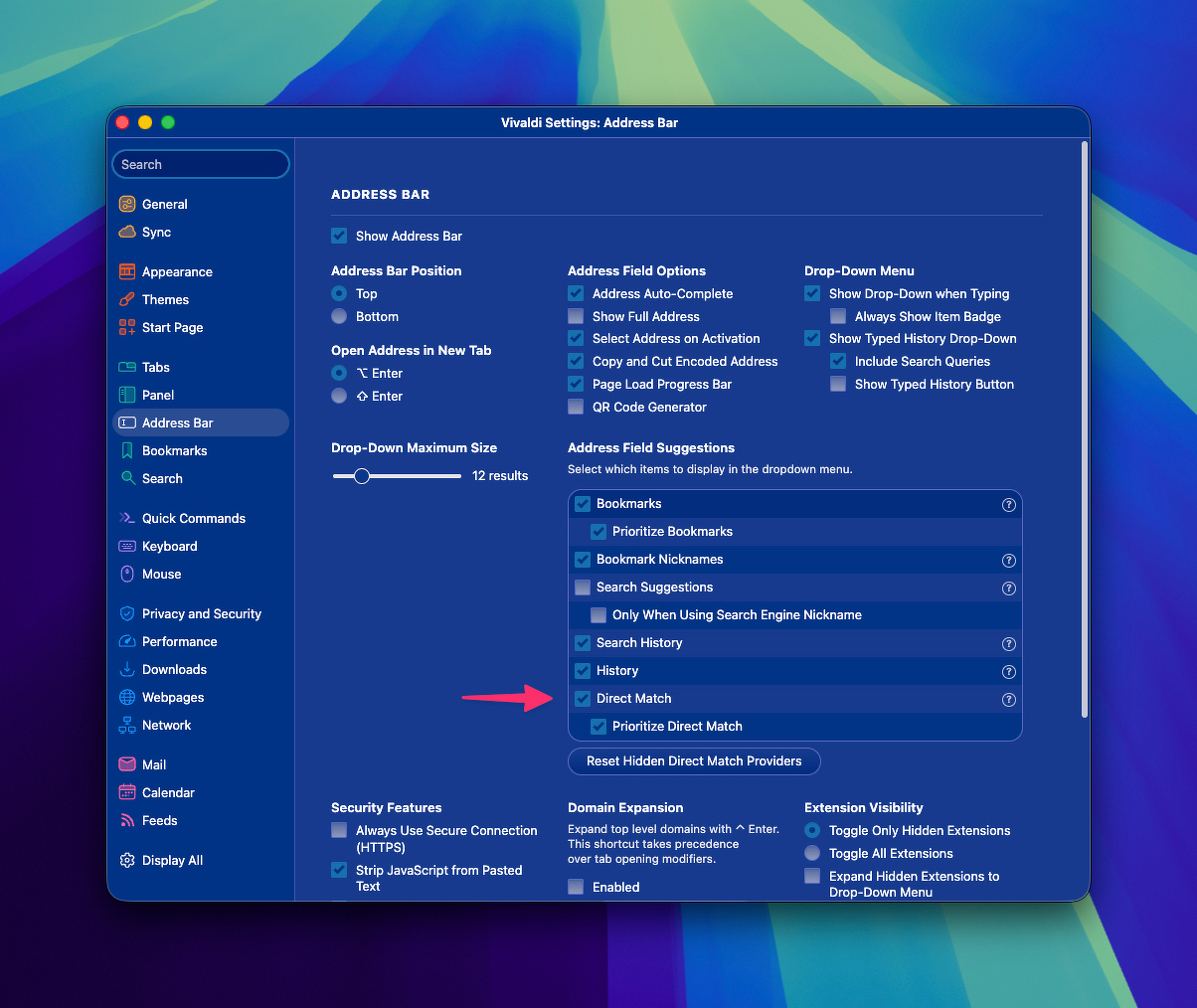
I’m sure most users haven’t done this because it’s not obvious what’s happening. I’d prefer if this were opt-in rather than something you have to hunt down and disable.
Before Disabling Direct Match
After Disabling Direct Match
Donate to support is how it should be
Vivaldi is a solid browser with genuine respect for customization and user control. The team’s Opera pedigree shows in the thoughtful features. You can donate directly to support their work, Vivaldi Donations.
The referral link integration feels a bit sneaky, even if I understand why it exists. If you’re aware of them and disable Direct Match upfront, Vivaldi makes for a capable browser (or secondary in my case).
-
Can you sell Brand Kits to people on Canva? Cause that’d be dope. 👍
-
You'll never guess what I was searching Perplexity AI for just now.
You'll never guess what I was searching Perplexity AI for just now.
- Can you provide examples of successful mini rack builds?
- What are the main benefits of using a mini rack for a home lab?
- A mini rack sommelier.
- I dabble in the racks of mini
- I'm somewhat of a mini rack connoisseur.
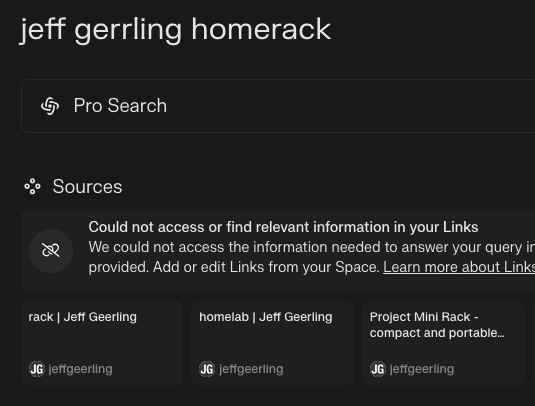
- Jeff Geerling's sweet MINI RACK
Ok, if you made it this far, you weirdos. Here is my MiniRack Dojo
https://www.perplexity.ai/collections/minirack-dojo-qotiBcSJSQekqymojD66Ow
/ DevOps / Productivity / Online Tools
-
Hey friends! Anyone here still using or loving IFTTT? I used to have so many automations set up but kinda fell off using it. Now I’m grandfathered into a super-discounted plan and debating whether to cancel or keep it. I’m saving $10/month right now, but if I cancel and need it again later, I’d have to pay full price. 😅 Does Anyone has any cool or useful automation they swear by? Looking for reasons to keep this going! lol 💜
-
How to Pick the Best Blog or Newsletter Platform in 2025
In 2025, blogging and newsletters remain essential tools for creators, businesses, and professionals. However, choosing the right one can be challenging with many available platforms. Whether you’re a beginner, a tech-savvy developer, or an established creator looking to monetize your content, this guide will help you navigate the options.
Key Factors to Consider
When evaluating platforms, consider the following:
• Ease of Use: Does the platform fit your technical skills?
• Customization: How much control do you want over design and functionality?
• Community and Discoverability: Does the platform help you grow your audience?
• Monetization Options: Can you earn money directly through the platform?
• Content Ownership: Do you retain control over your content?
• Cost: Does the platform align with your budget?
Use Cases and Recommendations
1. Beginners or General Use
For those new to blogging or looking for simple, user-friendly platforms, these options stand out:
• Medium: Ideal for casual bloggers who want to focus on writing and gain access to a built-in community.
• Micro.blog: Supports short-form and long-form blogging with cross-posting to Mastodon, Threads, and BlueSky. Great for personal sites with minimal monetization needs.
• Squarespace: Excellent for visually appealing blogs with drag-and-drop design and robust hosting.
• WordPress.com: Offers beginner-friendly features, extensive plugins, and SEO tools. It’s a solid choice if you want a customizable blog and don’t mind some maintenance.
2. Creators Focused on Newsletters or Monetization
For creators prioritizing audience growth and revenue, these platforms excel:
• Ghost: Combines blogging and newsletters with built-in subscription and membership tools. Ideal for creators seeking an all-in-one platform.
• Beehiiv: Designed for scaling newsletters with robust analytics and monetization options.
• Buttondown: Simple and lightweight, perfect for indie creators starting out with email subscriptions.
• Mailcoach: Self-hosted, providing full control over your newsletters without ongoing fees.
3. Tech-Savvy Developers
For developers who want complete control over their blogging setup:
• Hugo, Astro, or NextJS: Static site generators for blazing-fast performance and maximum customization. Requires technical expertise.
• WriteFreely: Open-source blogging software with minimalist, distraction-free writing.
• Hashnode: A tech-focused platform with GitHub integration and a developer-friendly audience.
4. Professionals and Thought Leaders
For business professionals aiming to grow their brand or network:
• LinkedIn Articles: A natural choice for thought leadership with built-in networking opportunities.
• Medium: Provides discoverability and a broad audience for professional writing.
Why You Might Want to Switch Off WordPress in 2025
WordPress has been a dominant blogging platform for years, but it’s no longer the best fit for every use case. Many users find its maintenance and performance issues burdensome. Here’s why you might consider switching:
• High Maintenance: Regular updates and plugin management can be time-consuming.
• Performance Issues: Without careful optimization, WordPress sites can become slow.
Better Alternatives for Specific Use Cases:
• Micro.blog: Great for personal blogs or creators who value simplicity.
• Ghost: Modern, fast, and equipped with monetization tools.
• Medium: Excellent for writing-focused creators seeking discoverability.
• Squarespace: A better fit for e-commerce or visually polished websites.
The Importance of Choosing Platforms with Good Content Policies
The content policies of a platform shape the kind of community it fosters and, by extension, the broader digital landscape. When choosing a blog framework or newsletter platform, it’s essential to consider how they address hate speech, harassment, and harmful behavior.
Platforms with clear and well-enforced content policies create spaces where diverse voices can thrive, and users feel safe. By supporting these platforms, we help build an internet that promotes constructive dialogue and meaningful engagement.
As creators, the platforms we choose reflect our values. Prioritizing platforms with strong content policies isn’t censorship; it’s about ensuring safe, inclusive spaces where everyone can participate respectfully. Together, we can contribute to a better, more responsible internet.
To help you choose the best platform for your blog or newsletter, I’ve compiled a comprehensive spreadsheet comparing 20 different services.
This resource covers key details like pricing, ease of use, audience suitability, and—importantly—their policies on hate speech, including links to their content policies.
I created this spreadsheet by thoroughly researching each platform’s features and policies to provide you with the essential information needed to make an informed choice…
👉 Here’s a link to the spreadsheet 👈
I hope that it saves you time and helps you find a platform that aligns with your values and goals.
Substack: A Troubling Example
Substack is popular for newsletters but criticized for its approach to hate speech. The company has stated it won’t remove Nazi content or other white supremacist ideologies unless it incites direct violence. This permissive stance has made it a hub for harmful ideologies.
Ask Yourself:
• Do you want to support a platform that tolerates Nazi content?
• Are you comfortable associating your brand with Substack’s content policy?
Platforms With Stronger Content Policies
• Ghost: Enforces clear guidelines against hate speech and white supremacy.
• Medium: Takes a strong stance against hateful content, fostering a positive community.
• Buttondown: Ethical and straightforward, with a commitment to inclusive content.
~~~~~~~~~~~~~~~~~~~~~~~~~~~~~~~~~

~~~~~~~~~~~~~~~~~~~~~~~~~~~~~~~~~
This guide has been helpful as you consider the best platform for your blog or newsletter? Well, I hope anyway.
Remember to be thoughtful about your choice; not just for features but for the online environment you want to support.
If you’d like to stay updated with more posts like this, consider subscribing to my newsletter.